← Products
Stripe Integration for NetSuite

Reconcile Stripe in NetSuite. Fees, payouts and disputes included.

Collect by payment link, customer statement, card-present Terminal or a deposit on the sales order. Every capture writes a payment record, every payout reconciles to the cent, and every Stripe ID is visible on the NetSuite record it belongs to.


Stripe Premier Partner Stripe Payments Specialization Stripe Financial Services Specialization Stripe Partner Advocate, Services
Stripe Terminal product photo
2–3 wks
Implementation
—
Currencies
A$8,000
From, per year

Four jobs, in the order finance does them.

01

Collect

·Pay Now links on invoices and on the sales order PDF for deposits
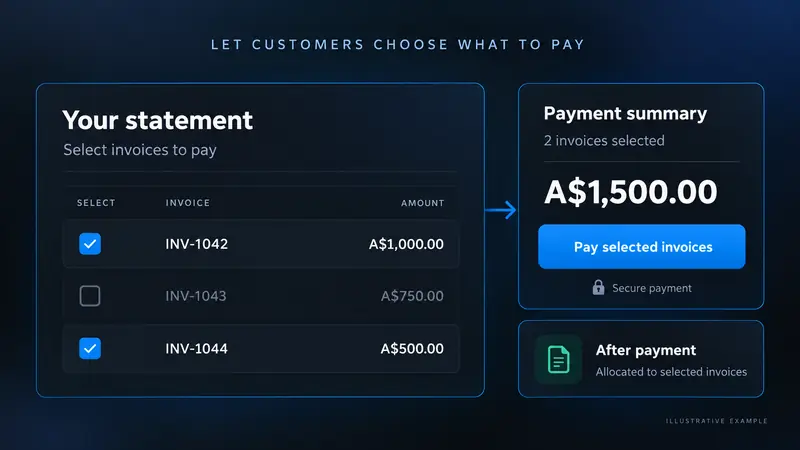
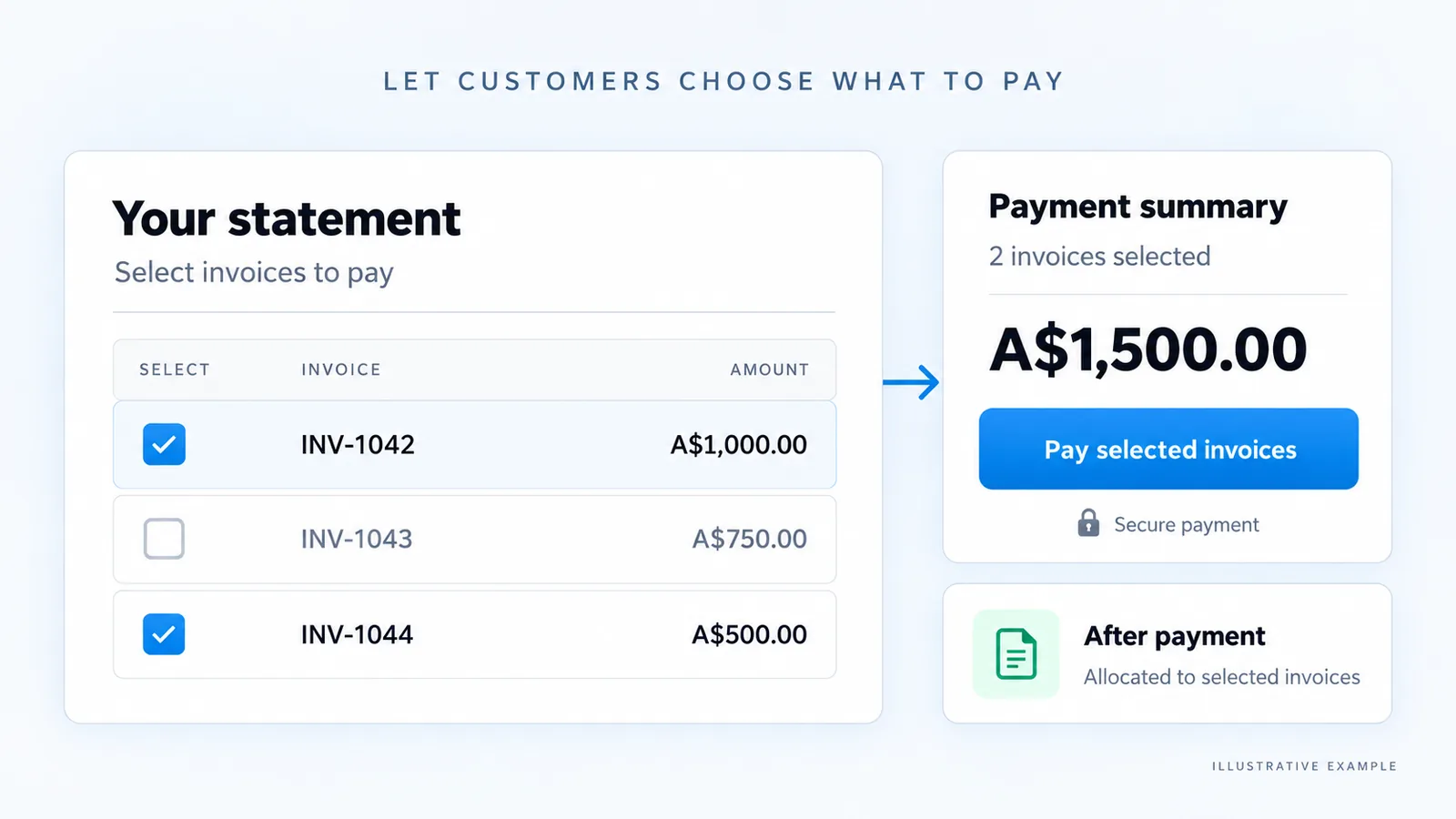
·Statement Pay, where the customer picks which invoices to settle
·Card-present payments through Stripe Terminal, with device and location management in NetSuite
·Every payment method your Stripe account has enabled
·Five checkout types: Hosted Checkout, Payment Intent with Elements, Checkout API, embedded Payment Form or the legacy page, set per Stripe account
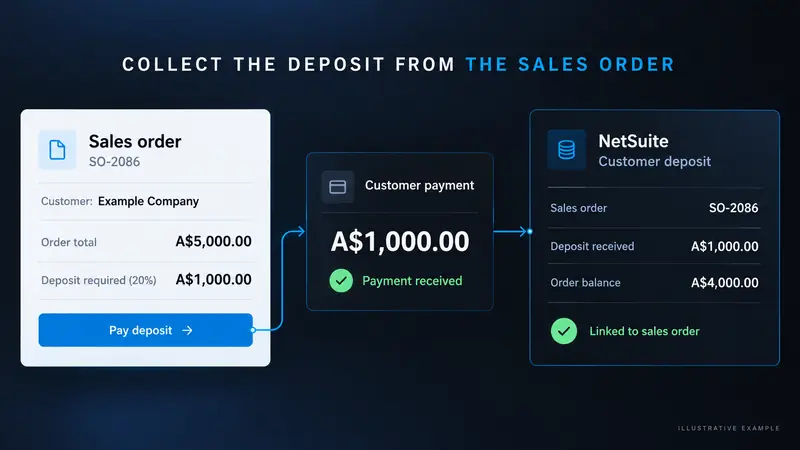
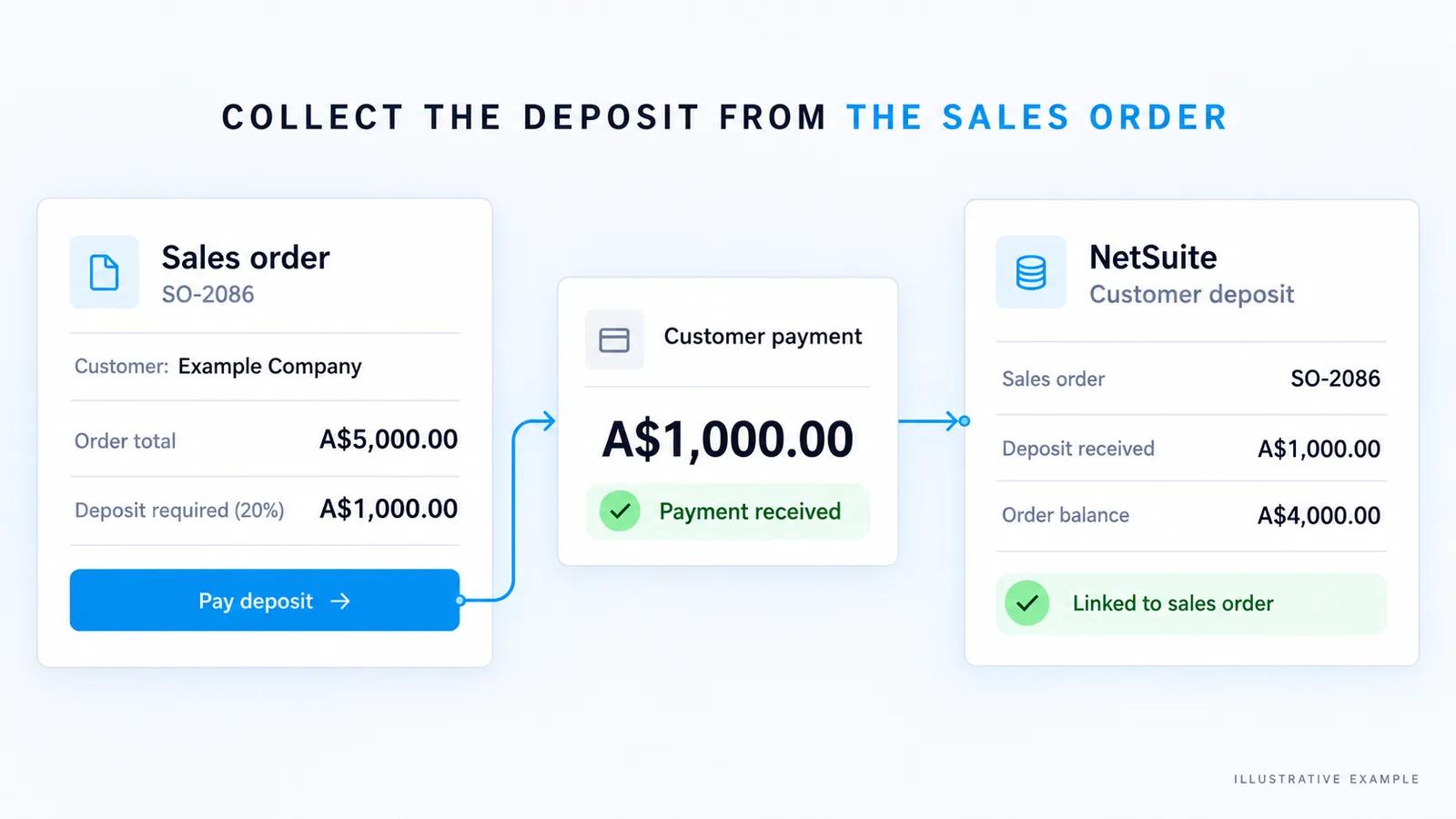
·Deposits on sales orders, partial payments by minimum amount or percentage, payment schedules and surcharges
·Bank transfer through the customer’s Stripe cash balance, applied when the funds arrive
·Payments taken in Stripe by a third-party system recorded and applied in NetSuite
02

Automate

·Payment and customer deposit records created on capture
·Customers and saved payment methods kept in step both ways
·Refunds and the full dispute lifecycle written back to NetSuite
·Dunning and retries on failed payments, with receipts issued from NetSuite
·Autopay charges saved payment methods on the due date, with exception reporting and automatic retries
·Refunds from the payment, deposit, credit memo or return authorisation, with refund caps set by preference
·Stripe Billing creates the sales order, invoices and credit memos follow the subscription, and closed lines flow into NetSuite revenue recognition
·Field mapping and rules configured on a record, not in a script, so they survive upgrades
03

Scale

·Multiple Stripe accounts mapped by subsidiary, by currency, or both
·Multi-currency settlement with the correct GL treatment per entity
·Ecommerce orders created from Stripe metadata — no separate ecommerce integration to buy
·Tax IDs, tax mapping and nexus follow the same configuration
·High-volume days do not stall the queue: messages process in batches, with two alternative routes when NetSuite capacity is busy
·Works with all 27 NetSuite language packs
04

Reconcile

·Payouts matched including Stripe fees, so the bank account clears
·Stripe charge, payout and customer IDs stored on the NetSuite record
·NetSuite transaction references visible in the Stripe dashboard
·Fees posted to the GL as journals, gross or net
·Every message from Stripe logged, so nothing lands in your account without a trail
Checkout

Instalments, part payments and payment-method discounts, on one page.

The page your customer pays on is built from the NetSuite invoice and its instalment schedule, so what they see matches what finance sees.
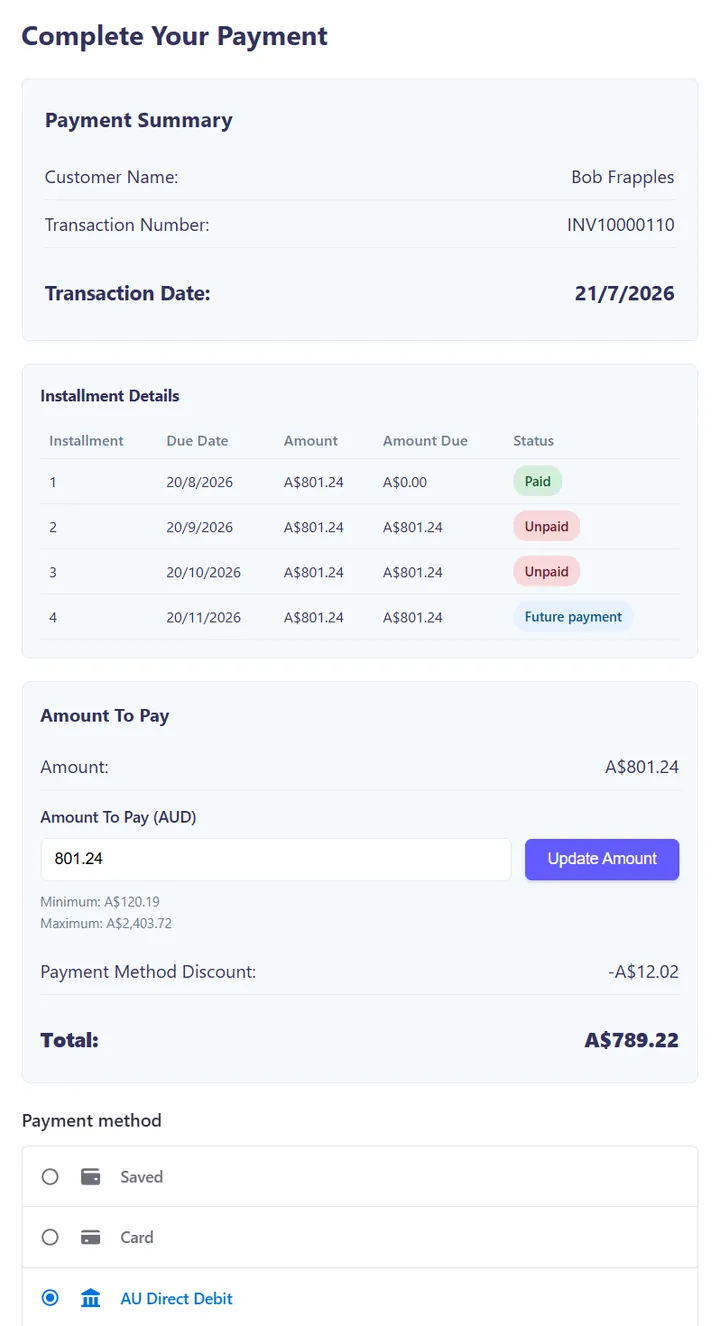
·Instalment schedule from NetSuite, with paid, unpaid and future instalments marked
·Part payments: the customer chooses how much to pay, between a minimum and the full balance outstanding
·Discounts or surcharges by payment method, shown before the customer pays
·Saved payment methods, card and AU Direct Debit on the same page
·Every payment recorded against the right invoice and instalment in NetSuite
SuiteFunction checkout for invoice INV10000110 showing four instalments of A$801.24 (one paid, two unpaid, one future), an amount-to-pay field with a minimum of A$120.19 and maximum of A$2,403.72, a payment method discount of A$12.02, a total of A$789.22, and payment options Saved, Card and AU Direct Debit
Checkout for invoice INV10000110: the first of four A$801.24 instalments is paid. The customer can pay anything from A$120.19 up to the A$2,403.72 outstanding; paying one instalment by AU Direct Debit takes a A$12.02 payment-method discount, for a total of A$789.22. Test data.
Inside NetSuite

Problems surface before your customer calls.

Health

Keys, mappings, bank accounts, stuck messages and payment errors in one dashboard.

Exceptions

Declines, pending and failed payments, and 3DS authentication follow-up in one queue.

Disputes

Disputes handled inside NetSuite rather than in the Stripe dashboard.

Payment queue

Every scheduled charge, its status and its retry, visible in one list.
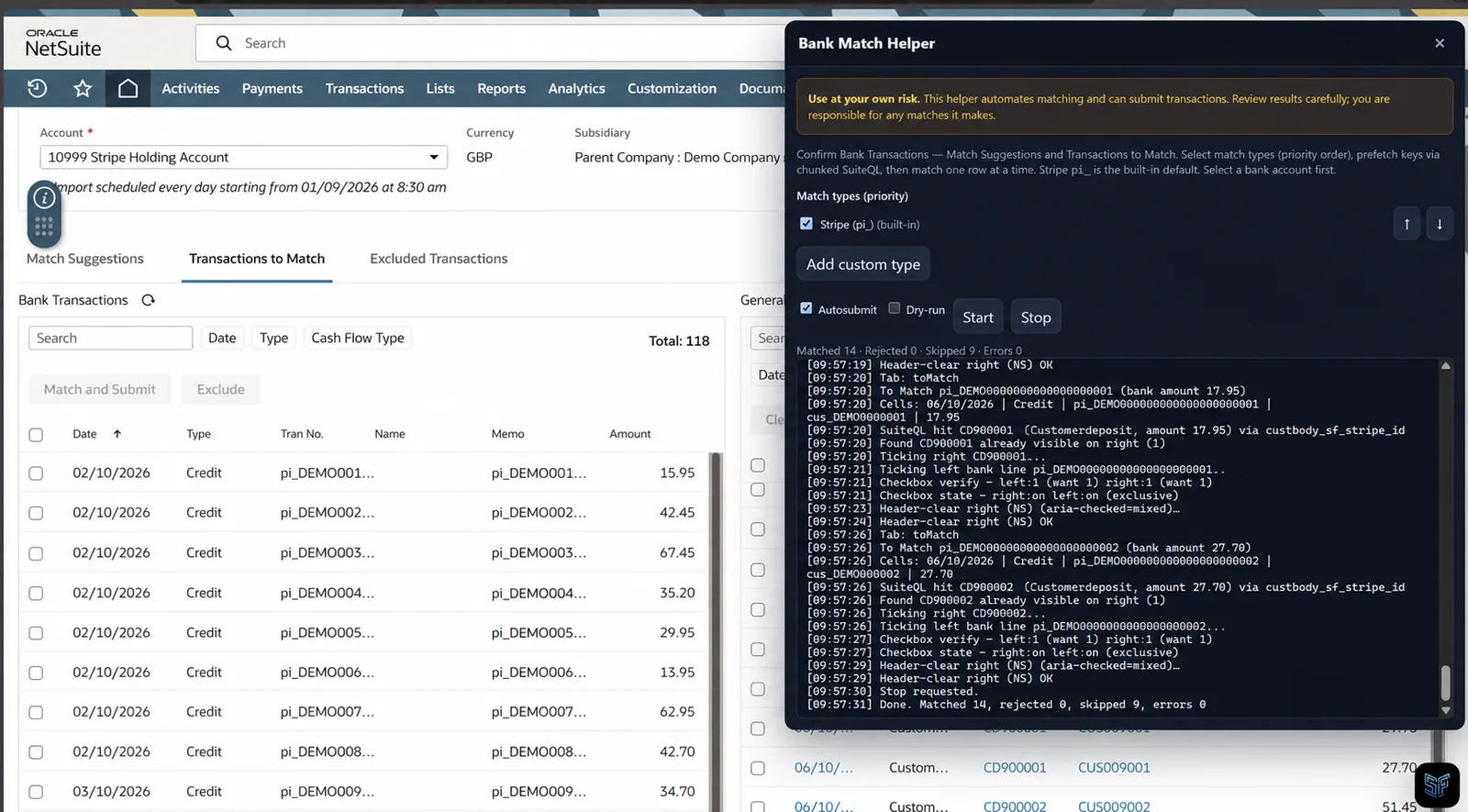
Inside the app
Payout reconciliation on NetSuite’s Confirm Bank Transactions page, with SuiteForge Bank Match matching Stripe payment references (pi_) to NetSuite transactions and logging each match
Stripe Terminal in use
Statement Pay: the customer selects invoices on their statement and pays, with the payment allocated to the selected invoicesStatement Pay: the customer selects invoices on their statement and pays, with the payment allocated to the selected invoices
Statement Pay: the customer selects invoices INV-1042 and INV-1044 on their statement and pays A$1,500, which is allocated to those two invoices.
Collect the deposit from the sales order: the customer pays a deposit from the sales order, recorded in NetSuite as a customer deposit linked to the orderCollect the deposit from the sales order: the customer pays a deposit from the sales order, recorded in NetSuite as a customer deposit linked to the order
Sales order deposit: the customer pays a A$1,000 deposit (20% of A$5,000) from sales order SO-2086, recorded in NetSuite as a customer deposit linked to the order.
Compared

Three ways to connect Stripe to NetSuite.

SuiteFunction Stripe Integration
NetSuite SuitePayments
Custom SuiteScript build
Payment links and Statement Pay
Included
Not included
Build it yourself
Stripe Terminal (card-present)
Included, with device and location management in NetSuite
Not included
Build it yourself
Payout reconciliation including fees
Included
Not included
Build it yourself
Refunds and disputes
Refunds and the full dispute lifecycle written back to NetSuite
Refunds from NetSuite transactions
Build it yourself
Multiple Stripe accounts
Mapped by subsidiary, currency or both
Per-gateway setup
Build it yourself
Stripe Billing
Supported (adds 2–3 weeks)
Not supported
Build it yourself
Who maintains it
SuiteFunction, through NetSuite and Stripe releases
Oracle / Stripe
Your developers
Time to live
2–3 weeks
Configuration only
Depends on scope
Customers

Running on the Stripe Integration.

Crimson Education

When Crimson Education moved its ERP to NetSuite, it brought in SuiteFunction to reconnect and reconfigure Stripe. Crimson now takes payments in 11+ countries and saves 10+ hours a week on payment management.

“Having a partner that knows what Stripe and NetSuite can do together is invaluable.”

Mark Ashley, Global Financial Controller
Read the story on stripe.com →
Questions we get asked

The objections, answered in public.

If the answer is a number, we publish the number.

How long does implementation take?

A standard implementation takes 2–3 weeks. Adding Stripe Billing normally adds another 2–3 weeks.

What does it cost?

From A$8,000 per year, plus implementation, which we quote once we have seen your setup.

Does this change our PCI scope?

Card data is tokenised by Stripe and never stored in NetSuite. The app holds Stripe identifiers and transaction references only, which keeps your NetSuite account out of cardholder-data scope.

Where is our data stored, and what leaves NetSuite?

Your payment records are stored in your NetSuite account, where the app runs as a SuiteApp. Stripe receives what it needs to process each payment, such as the amount, currency, customer and the NetSuite invoice or order reference. Card details are entered on Stripe’s own payment forms, so they go straight to Stripe and are never stored in NetSuite. Stripe’s event notifications reach NetSuite through a SuiteFunction relay that forwards each message without storing it. Our licence server receives your NetSuite account ID, licence status and aggregate counts of transactions and their value, never customer, invoice or card records.

Does it support Stripe Billing?

Yes. Stripe Billing normally adds 2–3 weeks to a standard implementation.

Can we run more than one Stripe account?

Yes. Accounts map to subsidiaries, to currencies, or to a combination of the two, and each maps to its own GL accounts.

Do we still need an ecommerce integration?

Often not. If your storefront writes order detail into Stripe metadata, we create the sales order in NetSuite from that — one fewer integration on the budget.

Who supports it once it is live?

We do. Standard support hours are 9am–5pm AEST, with an escalation path for payment-run failures, and enhanced support hours can be negotiated. The people who built it are the people who answer.

How is SuiteFunction’s Stripe integration different from an iPaaS such as Workato or Boomi?

An iPaaS is a general-purpose integration platform: it runs on its own servers, sits between NetSuite and many other systems, and is licensed separately. That suits businesses connecting lots of applications. SuiteFunction is a single-purpose Stripe app that installs inside your NetSuite account as a SuiteApp. Payment links, deposits, Terminal, disputes and payout reconciliation work in NetSuite’s own records, with nothing extra to build or map in a separate tool. Your payment records stay in NetSuite; Stripe’s event notifications pass through a SuiteFunction relay that forwards them without storing them. You pay one annual licence (from A$8,000), with no separate integration platform to subscribe to. If you already run an iPaaS for other systems, the two can work side by side.

Is SuiteFunction a Stripe partner?

Yes. SuiteFunction is a Stripe Premier Partner, Stripe’s top partner tier, with specialisations in Payments and Financial Services, and a Stripe Partner Advocate for services.

How much has it processed?

Figures load from the live feed.

Watch

Stripe and NetSuite, working as one.

A walkthrough of the Stripe Integration inside NetSuite.

See it running.

Book a demo